

By Elysha Vorstenbosch
Elysha Vorstenbosch joined the University of Limerick for the Spring semester on Exchange, having settled into life in Limerick Elysha now shares some facts and tips around living on the UL campus.
General Notes About Living on Campus
The campus for the University of Limerick is gorgeous. There are walking paths, beautiful, striking buildings, and so much green space and wildlife. Though you won’t see any squirrels (or at least I haven’t!), you will find a wide variety of birds, and dogs! On the lovely green space and walking trails, you can find many of the local residents walking around campus throughout the week. In particular, many families with kids and their dogs, wander around the campus on the weekend. Campus is very quiet on the weekends as almost all of the Irish students go home for the weekend.
In terms of eateries on campus, there are two pubs (Stables Club and Scholars Club), 3 restaurants (The Paddocks, Plaza, and Eden) and some fast food/cafes, and a lounge/bar (The Pavilion). Most of these are closed on the weekends. In general, I find most businesses, both on and off campus, close earlier than what I’m used to in Canada. Most stores in Limerick tend to close between 5pm – 7pm while pubs and bars close around 12am. My general advice is to always check a store’s hours and don’t assume it will be open late at night.
Size of Campus
With the amount of green space, the campus is fairly spread out and, thus, quite geographically large. It takes approximately 10-20 minutes to walk from Cappavilla Village to the UL Stables bus station and approximately 5 minutes of that time is alone taken up by walking across the Living Bridge. This is important to take into consideration when choosing your accommodation if you are planning to stay in one of the campus villages. I particularly chose Cappavilla Village as it’s right next to the Irish World Academy where most of my classes take place. If you must travel across campus regularly and you live in either Troy, Thomond, or Cappavilla Village, you can look into renting one of the rental bikes they offer to students living in these villages. And the best part, it’s FREE to rent these bikes. Yes! FREE! If you’re interested, ask your village reception for further details and make sure to take your student I.D. with you.
Heating System
As a person who comes from Canada, it’s common for and I’m accustomed to most houses and buildings having a built-in thermostat that maintains a set internal temperature. Upon arriving in Ireland and moving into my residence in Cappavilla Village, I was met with a chilly bedroom, an individual heater in each room and no thermostat. I learned that thermostats are not very common in Ireland due to how expensive gas and electricity are, and many buildings, particularly older buildings, are not well insulated. In place of a thermostat, it’s common for heaters to be used.
One of the first stressful things I experienced during my first week living in Ireland was the fear I was using too much heat and that I would be charged extra because of it. Our village reception informed us that we should use the heater timer, and only have it turned on for a few hours per day (a couple hours in the morning and a couple at night) and if we excessively exceed the amount allocated, we would be charged extra on top of our accommodation instalments. Despite having received an email from reception with minimal instructions on how to use the heater, I struggled to figure out how it worked for the first week until it finally clicked in my head. From my experience, I found that setting my heater to turn on a couple hours in the morning (i.e., 7:00 – 9:00) and evening before I go to bed (19:00 – 21:00 or 7pm – 9pm) generally provided enough heat, especially as these are the times I’m in my room. However, coming from a colder country, I have a higher tolerance to the colder and international students from warmer countries may find they need the heater turned on longer.
Here is a picture of the heaters found in Cappavilla Village:

This is the most common type of heater in the residences. If your village has a different heater, ask reception for assistance.
How to Set the Timer on the Heater
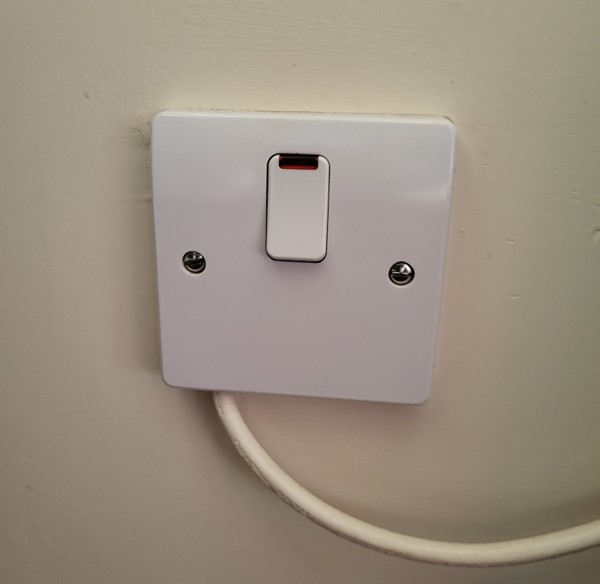
- Turn on the wall power switch for the heater. The light will light up when it is on. Fun fact: all outlets, including the outlets for the oven and stove, have switches that turn on/off the power to the outlet.
Off:
On:


- The rightmost switch determines how long the heater will be on for. The three settings are: timer (top: clock picture), off (middle: circle picture) or on (bottom: flame-like picture). To set it to the timer, push the switch to the top position with the picture of a clock.

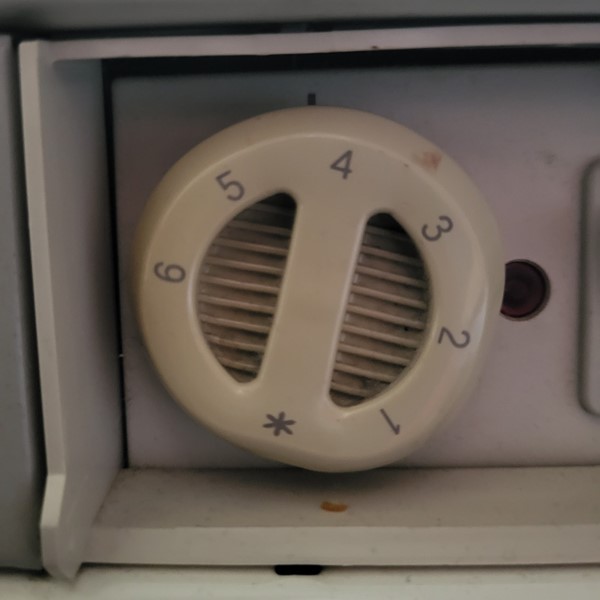
- The leftmost dial determines the level of heat emitted from the heater. Turn it to your desired setting. The higher the number (i.e., 6), the more heat it emits, and the lower the number (i.e., 1), the less heat it emits.
- The middle dial determines when the heater will turn on and off when it’s in timer mode. Turn the dial clockwise so that the arrow at the top of the dial points to the current time. For example, if the time is currently 10am, set the dial so the arrow points to 10:00. This dial acts as a clock or a time and will rotate with the passing of time. In the centre of the dial, there is a circle of small grey knobs next to a time or number on a clock. These knobs control when the heater will turn off and on. When the knobs are pushed outwards, the heater will turn on during the times associated with the knobs, and when the knobs are pushed inwards, the heater will turn off. For example, if I wanted my heater to turn on from 7am – 9am and 7pm – 9pm, I would push out the knobs next to and between 7:00 – 9:00 and 19:00 – 21:00 (remember, they use military/24-hour time!) and push all the other knobs in.

- Voila! You’ve set a timer for your heater! If you find it cold and it’s outside of the times you’ve set your heater to turn on, you can either change your timer settings or you can switch the rightmost switch to the bottom, ‘on’ setting (flame-like picture).
Water Heating
Another cultural difference that took me a while to adjust to was that the water heating is set on a timer and only turns on during a specified time period. Once again, this is a strategy to save money on gas and electricity bills. If someone uses a water tap or shower outside these designated times, the water will not warm up, unless the ‘boost’ button 5 on the electricity meter. Each village sets the timer for their water heaters to different times. For Cappavilla Village during the 2023 Spring term, the water heater was set to turn on from 6:00am – 8:00am and 16:00pm – 20:00pm (4pm – 8pm). This may change in the future, so if you plan to live in Cappavilla Village or any other village in the future, reach out to your village reception for information on the times the heater is set to turn on to ensure you aren’t taken by surprise when you step into an ice cold shower.




 Study Ireland - Stories & Guides from International Students
Leave a comment